Simplifying Apple for Seniors
This project aims to bridge the digital divide for older adults by creating a user-friendly guide for first-time Apple phone users.
Inspired by the challenges faced by my grandparents, the project focuses on making technology more accessible and inclusive for seniors
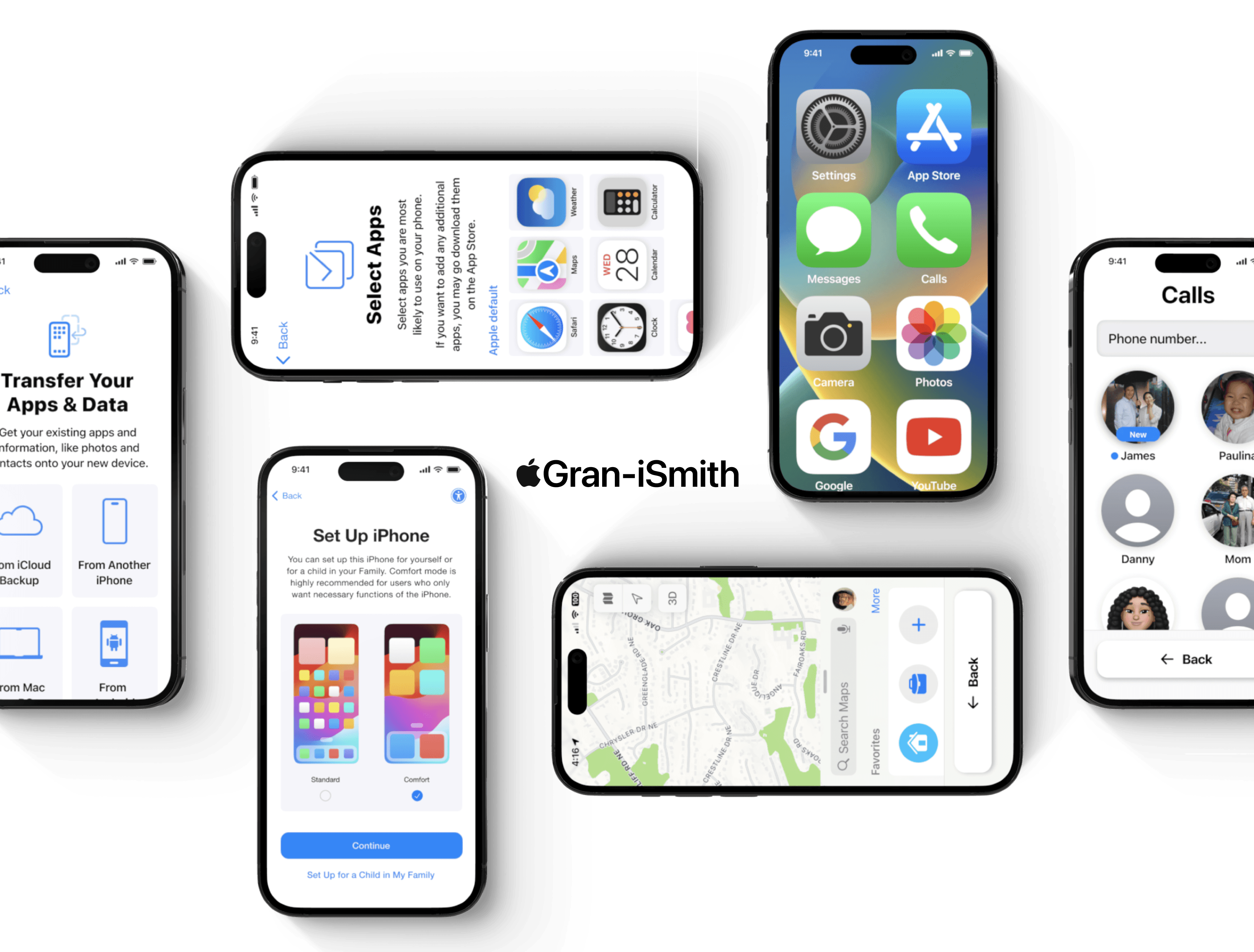
Simplifying Apple for
Seniors
This project aims to bridge the digital divide for older adults by creating a
user-friendly guide for first-time Apple phone users.
Inspired by the challenges faced by my grandparents, the project focuses
on making technology more accessible and inclusive for seniors.
How can interface design for smartphones be optimized to reduce cognitive load and improve usability for elderly users?
Design Process
Analysis & Research
Concept Design
Design Outcome
Digital Commercial
Starting with a textual storyboard,
I brought it to life using Dall-E to
generate images. Runway then
transformed these images into
animations, which were seamlessly
integrated into the final commercial.
AI behind the
commercial
User Analysis
In today's rapidly evolving world,
AI is an indispensable tool. By
harnessing AI's capabilities, I was
able to visualize my ideas and bring
them to life exactly as I imagined.
The future of
storytelling—AI
User Analysis
Analysis & Research
How many seniors own a smartphone?
Trend Research and Statistics
Personalization
Accessibility
Increasing Tech
Trends
There was a
increase in senior smartphone
owners from 2012-2021
48%
Trend Research and Statistics
...resist adopting new technology.
...prefer simple interfaces.
...need clear navigation.
...may need guidance.
...often have limited app usage.
Seniors...👨🏻🦳
User Analysis

Communication

Web Browsers
Entertainment


Banking

Camera

Health

Time & Date

News
Maps

These are the primary app categories seniors
frequently use on their phones. Beyond these
essential apps, additional applications may be less
convenient for their needs.
Commonly Utilized Applications

Staying at home, Grace often watches TV or
streams shows on her phone. Initially, she found it
challenging to adapt to her smartphone, indicating
she's not very tech-savvy.
Persona 1
Grace Young 67
Grandmother of two

Soonja frequently calls her family. She's tech-
savvy, and learned her phone's at the Senior Care
Center. She lives with a few health conditions, and
uses her phone to stay in touch with her caretaker.
Persona 2
Soonja Kye 90
Great grandmother of many
...simplify the setup process
...for seniors?
...simplify the interface?
...make a clearer navigation?
...make lessons easier?
How might we...🤔
Journey Map
Scroll Right

Concept Design

Wireframes
Scroll Right
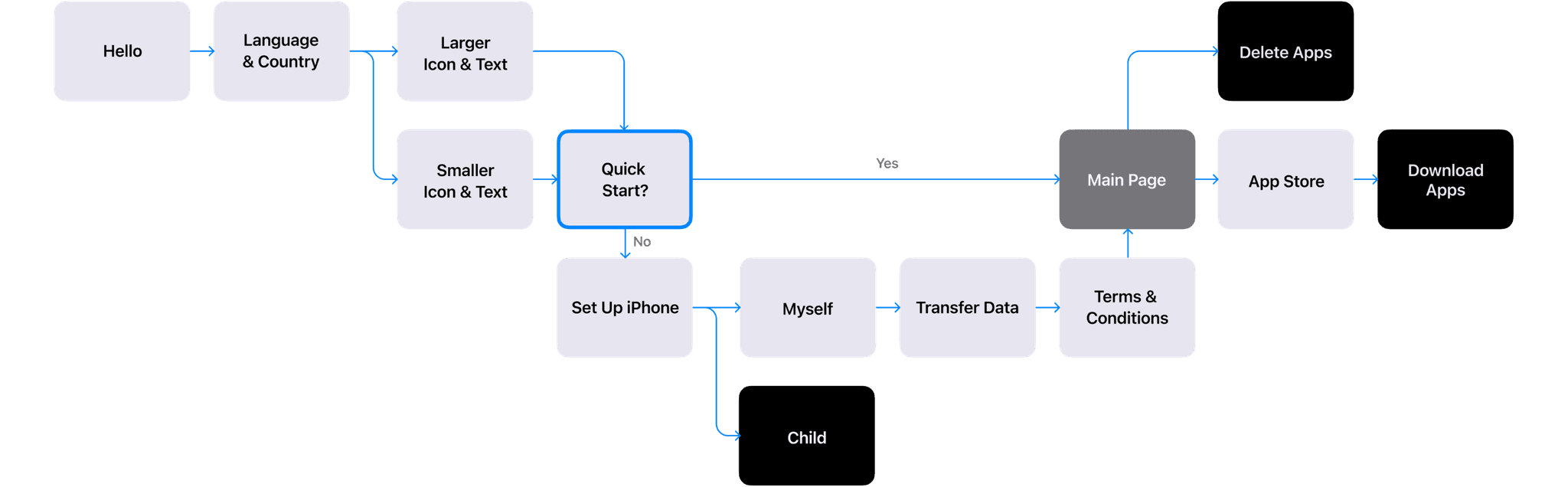
User Flow (Before)
Scroll Right
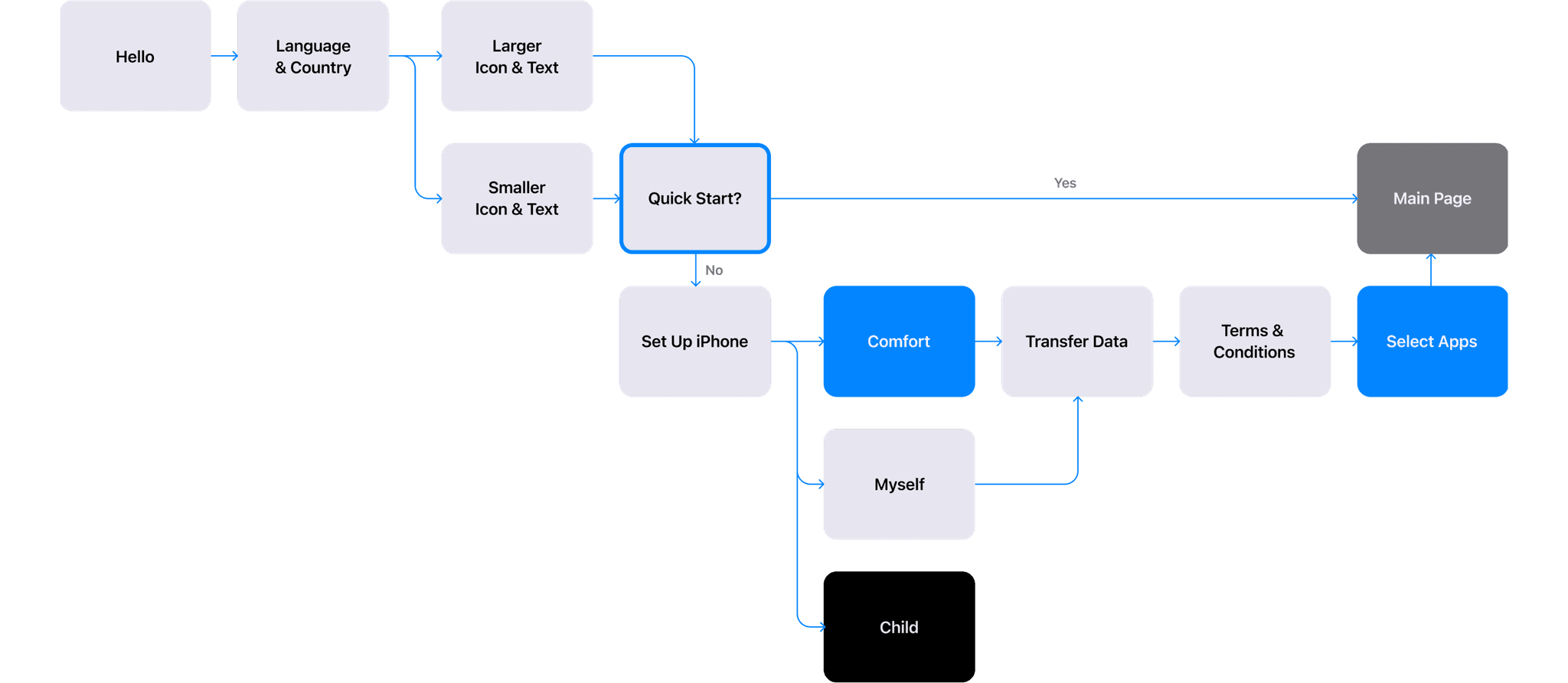
User Flow (After)
Scroll Right
Concept Design

Gran-iSmith
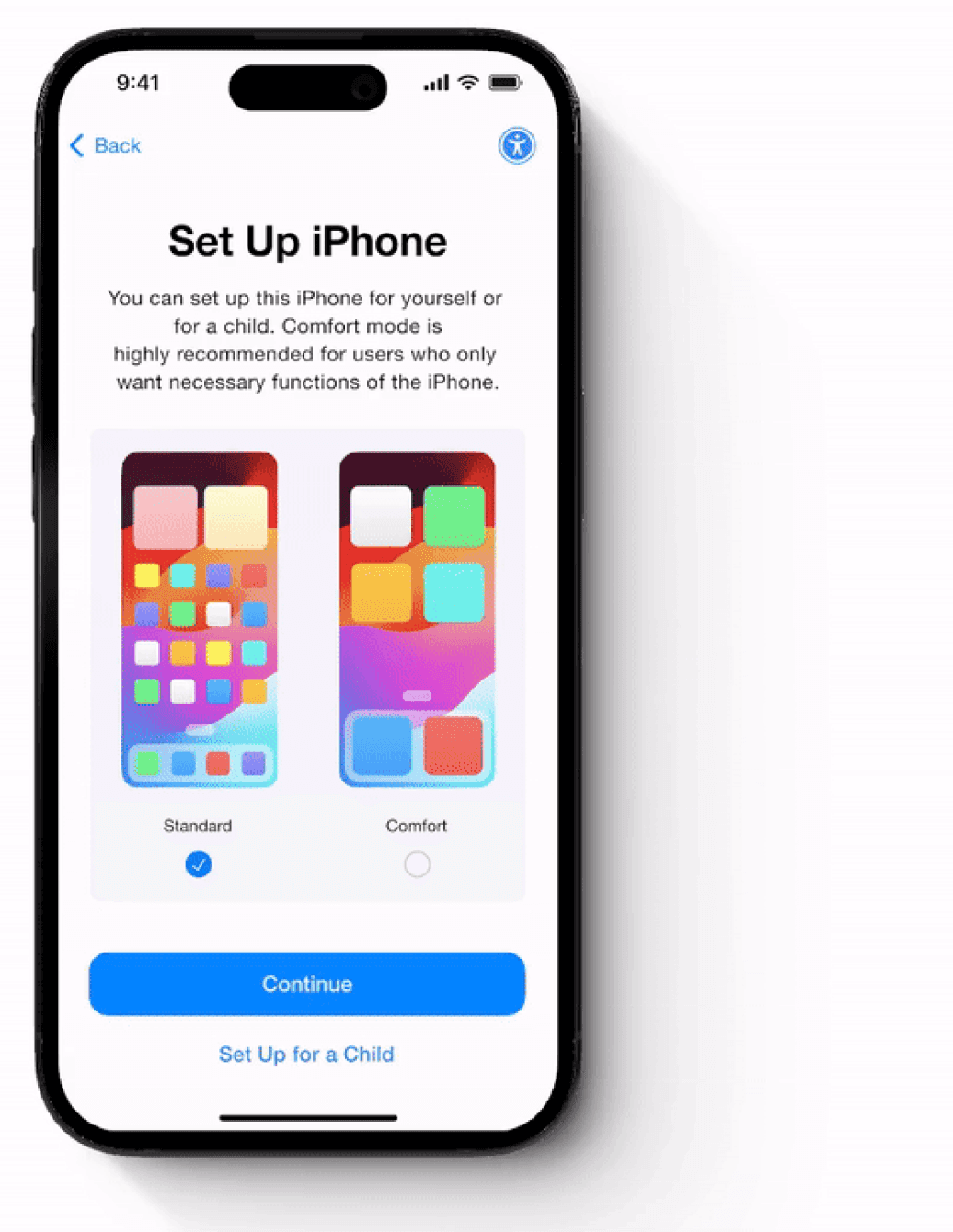
Setting Up Comfort Mode

Customize your iPhone when you
Set Up.
Easy Set Up
Switch your iPhone to Comfort Mode while
setting up your new device. This feature simplifies
the setup process with clear, concise instructions,
larger, bolder text, and easy-to-read icons.
Just one click of a button
When setting up your iPhone, choose the apps you
want to use and eliminate any unnecessary ones.
Keep only what you need. Remember you can always
download additional apps from the App Store later.

Customize your Homescreen


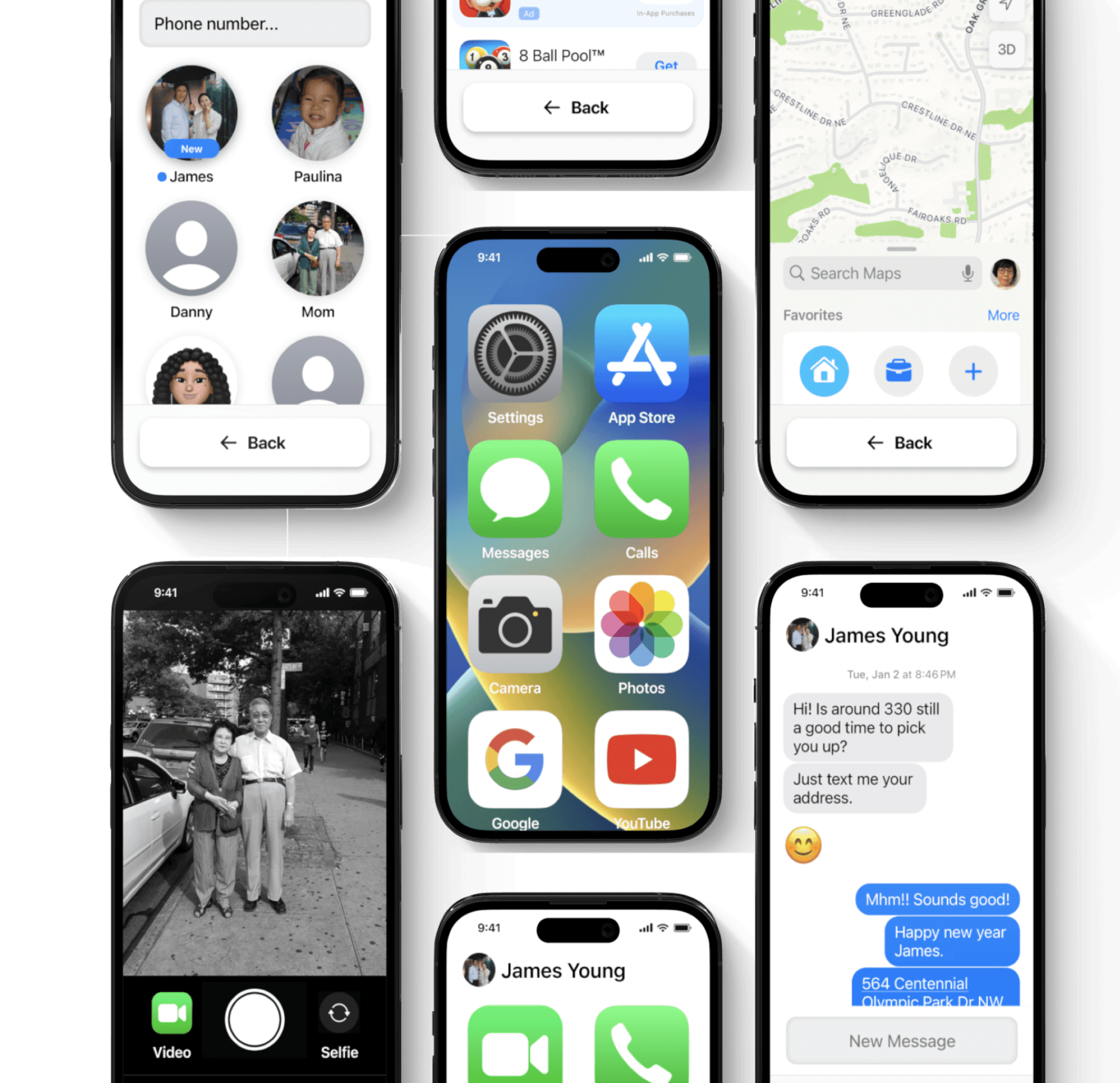
Comfort Mode Interface
Easy to navigate,
Easy to use.
Easy Set Up


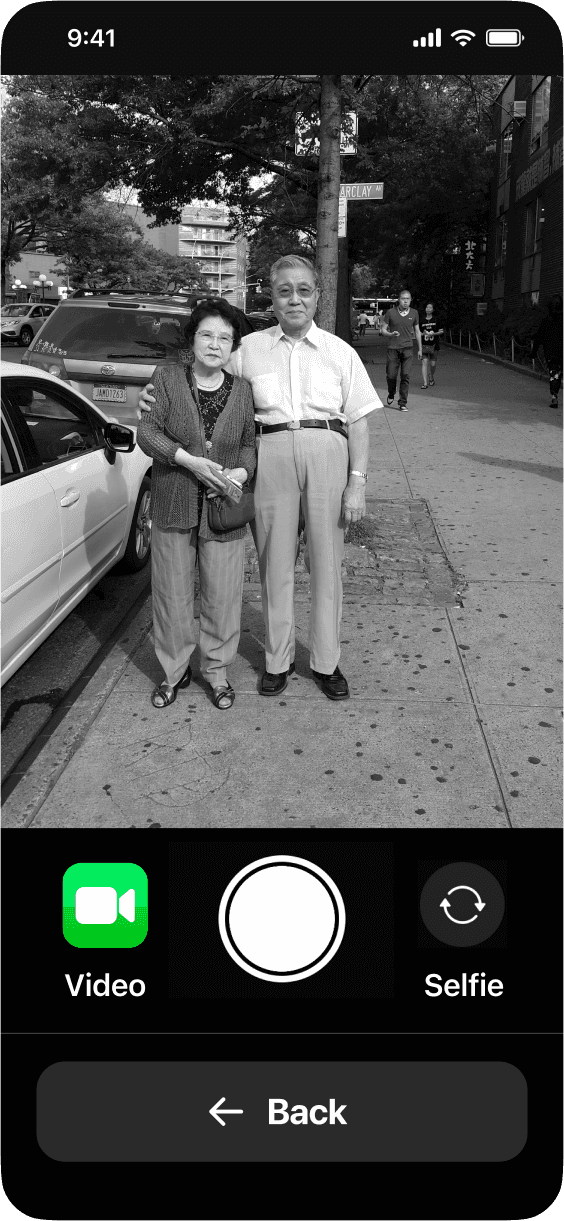
A new layout with larger icons and text. Every
detail's imagery and icons are now bigger. The
font size is increased and bolder, creating a simple,
easy-to-read, and easy-to-navigate interface.
Bigger Icons, Bolder Texts
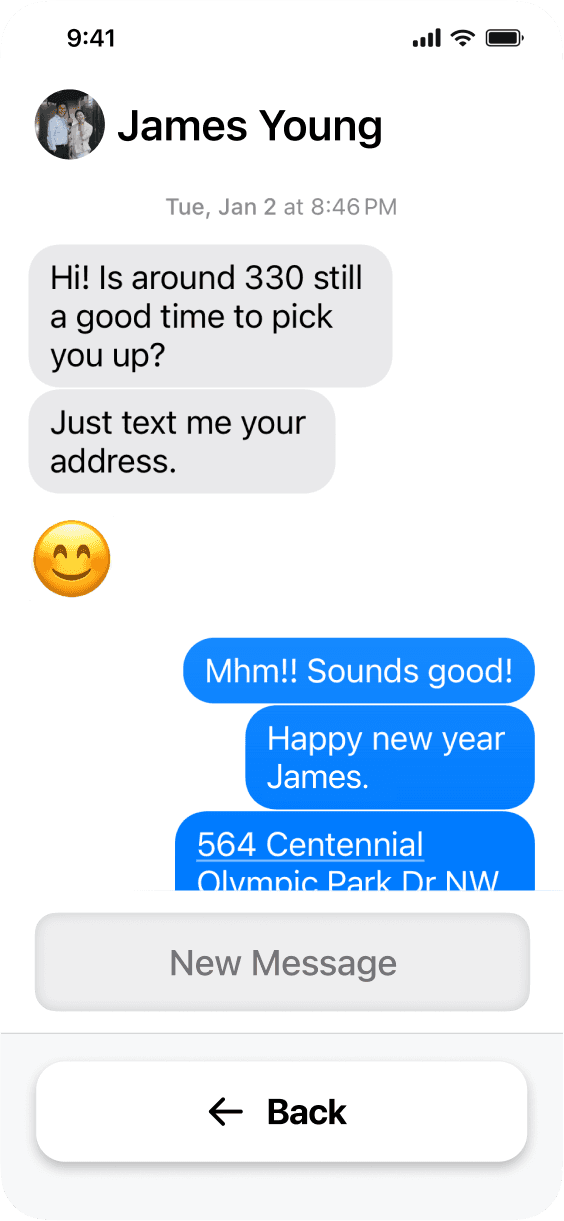
Making calls and sending messages is effortless, just
a few clicks away. Navigation is simplified, keeping
only essential numbers on your phone for easy access.
Easy Navigation


A bigger and consistent back button on the bottom for easy navigation.
Simple and Consistent

In-Person Apple Store
Service that Provide Free Classes
and 1:1 Assistance.
Accessible Assistance
All Screens
Scroll Right

What I would improve if I had more time
If I had more time and the opportunity to dive in deeper into this project, I would like to focus more on the interface of specific Apple apps, and improve the layout to be more senior-friendly or accessible. I would also like to explore android phones and possibly create something senior-compatible for them too.
What I took away from this project
This project has been a rewarding experience for me to explore the needs of seniors, a demographic that is often overlooked. I had the opportunity to dive deep into understanding accessibility and the challenges that seniors face in adapting to our fast-changing world and new technology. It was a fun challenge to mingle with my grandma and grandpa more through this opportunity.
Reflection
How can interface design for smartphones
be optimized to reduce cognitive load and
improve usability for elderly users?
In today's rapidly evolving world, AI is
an indispensable tool. By harnessing AI's
capabilities, I was able to visualize my ideas
and bring them to life exactly as I imagined.
The future of
storytelling—AI
User Analysis
Starting with a textual storyboard, I
brought it to life using Dall-E to generate
images. Runway then transformed these
images into animations, which were seamlessly
integrated into the final commercial.
AI behind the
commercial
User Analysis
Design Process
Analysis & Research
Concept Design
Design Outcome
Digital Commercial
Analysis & Research
Journey Map
Purchasing
Setting up
Customizing
Adapting
Choosing which phone to buy
Purchasing new phone
Setting up the iPhone
Getting help from family
Learning all the functions
Customizing Phone (Apps)
Adapting to the phone
Choosing which store to go to and what phone to purchase.
“I had a really hard time learning how to use my phone, especially without any help from anyone.”
“I was worried that I would click the wrong button.”
“I didn’t know which apps I had to download and how to do it.”
“ Video courses online were too fast paced and complicated.”
"The worker had to help me set my phone up. Without him I wouldn’t have known what to do.”
“My granddaughter set my phone up for me. I don’t really know what she did to my phone.”
“I had a hard time choosing which phone was best for me. They all look the same!”
“I just bought the one my daughter told me to buy.”
Setting up the phone, choosing font size, logging in, etc.
Learning different phone functions and managing apps.
Adapting and getting used to all the functions in the phone.
🙂
😐
🙁
Trend Research and Statistics
There was a
increase in senior smartphone
owners from 2012-2021
48%
Personalization
Accessibility
Increasing Tech
Trends
How many seniors own a smartphone?

Communication

Web Browsers
Entertainment

Banking

Camera

Health

Time & Date

News
Maps

These are the primary app categories seniors frequently use on
their phones. Beyond these essential apps, additional applications
may be less convenient for their needs.
Commonly Utilized Applications
...resist adopting new technology.
...prefer simple interfaces.
...need clear navigation.
...may need guidance.
...often have limited app usage.
Seniors...👨🏻🦳
User Analysis

Staying at home, Grace often watches TV or streams shows on her
phone. Initially, she found it challenging to adapt to her smartphone,
indicating she's not very tech-savvy.
Persona 1
Grace Young 67
Grandmother of two

Soonja frequently calls her family. She's tech-savvy, and learned her
phone's at the Senior Care Center. She lives with a few health
conditions, and uses her phone to stay in touch with her caretaker.
Persona 2
Soonja Kye 90
Great grandmother of many
...simplify the setup process for seniors?
...simplify the interface?
...make a clearer navigation?
...make lessons easier?
How might we...🤔
Concept Design


Wireframes

User Flow (Before)

User Flow (After)
Setting Up Comfort Mode

Customize
your iPhone
when you
Set Up.
Easy Set Up
Switch your iPhone to Comfort Mode while setting up your new
device. This feature simplifies the setup process with clear, concise
instructions, larger, bolder text, and easy-to-read icons.
Just one click of a button

When setting up your iPhone, choose the apps you want to use and
eliminate any unnecessary ones. Keep only what you need. Remember
you can always download additional apps from the App Store later.
Customize your Homescreen


Gran-iSmith
Design Outcome

A bigger and
consistent back
button on the
bottom for
easy navigation.
Simple and Consistent
A new layout with larger icons and text. Every detail's imagery and
icons are now bigger. The font size is increased and bolder, creating
a simple, easy-to-read, and easy-to-navigate interface.
Bigger Icons, Bolder Texts
Making calls and sending messages is effortless, just a few clicks
away. Navigation is simplified, keeping only essential numbers on
your phone for easy access.
Easy Navigation
Easy to
navigate,
Easy to use.
Simple Interface
Comfort Mode Interface
Accessible Assistance

In-Person Apple
Store Service that
Provide Free
Classes and 1:1
Assistance.




All Screens
Reflection
What I took away from this project
This project has been a rewarding experience for me to explore the needs of seniors, a demographic that is often overlooked. I had the opportunity to dive deep into understanding accessibility and the challenges that seniors face in adapting to our fast-changing world and new technology. It was a fun challenge to mingle with my grandma and grandpa more through this opportunity.
What I would improve if I had more time
If I had more time and the opportunity to dive in deeper into this project, I would like to focus more on the interface of specific Apple apps, and improve the layout to be more senior-friendly or accessible. I would also like to explore android phones and possibly create something senior-compatible for them too.
Simplifying Apple for Seniors
This project aims to bridge the digital divide for older adults by creating a user-friendly guide for first-time Apple phone users.
Inspired by the challenges faced by my grandparents, the project focuses on making technology more accessible and inclusive for seniors
How can interface design for smartphones
be optimized to reduce cognitive load and
improve usability for elderly users?
The future of storytelling—AI
In today's rapidly evolving world, AI is
an indispensable tool. By harnessing AI's
capabilities, I was able to visualize my ideas
and bring them to life exactly as I imagined.
Digital Commercial 1
AI behind the commercial
Starting with a textual storyboard, I
brought it to life using Dall-E to generate
images. Runway then transformed these
images into animations, which were seamlessly
integrated into the final commercial.
Digital Commercial 2
Design Process
Analysis & Research
Concept Design
Design Outcome
Digital Commercial
Analysis & Research
Trend Research and Statistics
There was a
increase in senior smartphone
owners from 2012-2021
48%
Personalization
Accessibility
Increasing Tech
Trends
How many seniors own a smartphone?
...resist adopting new technology.
...prefer simple interfaces.
...need clear navigation.
...may need guidance.
...often have limited app usage.
Seniors...👨🏻🦳
User Analysis

Communication

Web Browsers
Entertainment

Banking

Camera

Health

Time & Date

News
Maps

These are the primary app categories seniors frequently use on their
phones. Beyond these essential apps, additional applications may be less
convenient for their needs.
Commonly Utilized Applications
Journey Map
Purchasing
Setting up
Customizing
Adapting
Choosing which phone to buy
Purchasing new phone
Setting up the iPhone
Getting help from family
Learning all the functions
Customizing Phone (Apps)
Adapting to the phone
Choosing which store to go to and what phone to purchase.
“I had a really hard time learning how to use my phone, especially without any help from anyone.”
“I was worried that I would click the wrong button.”
“I didn’t know which apps I had to download and how to do it.”
“ Video courses online were too fast paced and complicated.”
"The worker had to help me set my phone up. Without him I wouldn’t have known what to do.”
“My granddaughter set my phone up for me. I don’t really know what she did to my phone.”
“I had a hard time choosing which phone was best for me. They all look the same!”
“I just bought the one my daughter told me to buy.”
Setting up the phone, choosing font size, logging in, etc.
Learning different phone functions and managing apps.
Adapting and getting used to all the functions in the phone.
🙂
😐
🙁

Staying at home, Grace often watches TV or streams shows on her
phone. Initially, she found it challenging to adapt to her smartphone,
indicating she's not very tech-savvy.
Persona 1
Grace Young 67
Grandmother of two

Soonja frequently calls her family. She's tech-savvy, and learned her
phone's at the Senior Care Center. She lives with a few health conditions,
and uses her phone to stay in touch with her caretaker.
Persona 2
Soonja Kye 90
Great grandmother of many
...simplify the setup process for seniors?
...simplify the interface?
...make a clearer navigation?
...make lessons easier?
How might we...🤔
Concept Design
Wireframes
User Flow (Before)
User Flow (After)

Gran-iSmith
Design Outcome
Setting Up Comfort Mode

Customize
your iPhone
when you
Set Up.
Easy Set Up
Switch your iPhone to Comfort Mode while setting up your new device.
This feature simplifies the setup process with clear, concise instructions,
larger, bolder text, and easy-to-read icons.
Just one click of a button

When setting up your iPhone, choose the apps you want to use and
eliminate any unnecessary ones. Keep only what you need. Remember
you can always download additional apps from the App Store later.
Customize your Homescreen
Comfort Mode Interface

Easy to
navigate,
Easy to use.
Simple Interface
A new layout with larger icons and text. Every detail's imagery and icons
are now bigger. The font size is increased and bolder, creating a simple,
easy-to-read, and easy-to-navigate interface.
Bigger Icons, Bolder Texts
Making calls and sending messages is effortless, just a few clicks away.
Navigation is simplified, keeping only essential numbers on your phone
for easy access.
Easy Navigation

A bigger and
consistent back
button on the
bottom for
easy navigation.
Simple and Consistent
Accesible Assistance

In-Person Apple
Store Service that
Provide Free
Classes and 1:1
Assistance.
All Screens
Reflection
What I took away from this project
This project has been a rewarding experience for me to explore the needs of seniors, a demographic that is often overlooked. I had the opportunity to dive deep into understanding accessibility and the challenges that seniors face in adapting to our fast-changing world and new technology. It was a fun challenge to mingle with my grandma and grandpa more through this opportunity.
What I would improve if I had more time
If I had more time and the opportunity to dive in deeper into this project, I would like to focus more on the interface of specific Apple apps, and improve the layout to be more senior-friendly or accessible. I would also like to explore android phones and possibly create something senior-compatible for them too.